> ## Documentation Index
> Fetch the complete documentation index at: https://cheetahai.co/docs/llms.txt
> Use this file to discover all available pages before exploring further.
# Integrated Wallet
> Manage keys, sign transactions, and interact with blockchains without leaving the editor
## Your Wallet Lives in the IDE
No MetaMask. No Phantom. No browser extensions. The wallet is built directly into the editor sidebar. You create or import a wallet once, and it handles signing, chain switching, and balance queries for both EVM chains and Solana.
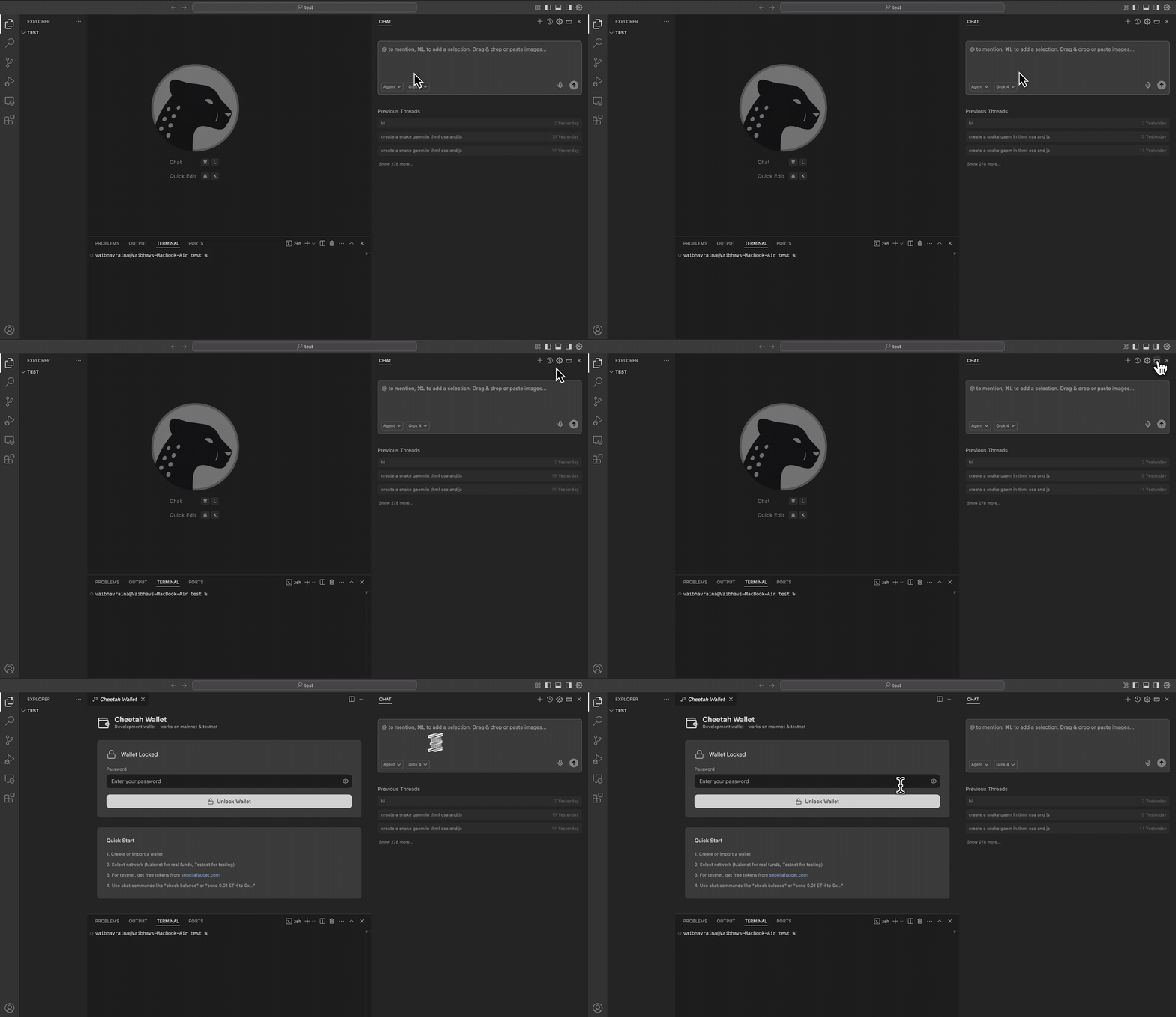 ## Opening the Wallet
Click the wallet icon in the sidebar, or ask the AI:
```
"Open my wallet"
```
```
"Connect wallet"
```
The wallet panel shows your address, current network, and balance. From here you can switch chains, copy your address, and see transaction history.
## Creating or Importing a Wallet
### Create a New Wallet
If you don't have a wallet yet, you'll be prompted to create one. This generates:
* An EVM address (0x...) for Ethereum, Polygon, Arbitrum, etc.
* A Solana address (base58) for Solana networks
Both are derived from the same private key. You'll set a password to encrypt the key locally.
Save your recovery phrase somewhere safe. If you lose it and forget your password, your wallet is gone.
### Import an Existing Wallet
Already have a wallet from MetaMask, Phantom, or another tool? Import it:
```
"Import my wallet"
```
You can import using:
* A private key (hex string)
* A seed phrase (12 or 24 words)
Your key is encrypted with AES-256-GCM and stored in your OS keychain (macOS Keychain, Windows Credential Manager). It never leaves your machine.
On first launch of the app, macOS will show a Keychain access popup asking for your Mac login password. This is your operating system protecting your data — the app stores wallet keys and settings in the same secure vault as your Wi-Fi passwords and Safari credentials. Enter your Mac password and click **Always Allow** so you don't get prompted again.
## Switching Networks
The network dropdown in the wallet panel shows all available chains, grouped by category:
**Local Development**
* Local EVM (Anvil at `localhost:8545`)
* Local Solana (`localhost:8899`)
**Testnets**
* Ethereum Sepolia, Polygon Amoy, BSC Testnet, Arbitrum Sepolia, Optimism Sepolia, Base Sepolia, Avalanche Fuji
* Solana Testnet
**Mainnets**
* Ethereum, Polygon, BNB Smart Chain, Arbitrum One, Optimism, Base, Avalanche C-Chain
* Solana Mainnet
Or switch via chat:
```
"Switch to Sepolia"
```
```
"Switch to local EVM"
```
```
"Switch to Solana testnet"
```
Your EVM address stays the same across all EVM networks. Your Solana address is separate but also consistent across Solana clusters.
## What is Local EVM?
Local EVM is a local Ethereum node powered by Anvil (part of Foundry) running at `http://127.0.0.1:8545`. When you start it:
* You get pre-funded test accounts with unlimited ETH
* Blocks confirm instantly (no waiting)
* Gas is free
* State resets when you stop the node
It's the fastest way to develop and test contracts. No faucets, no waiting, no rate limits.
Start it with:
```
"Start a local EVM node"
```
## What is Local Solana?
Local Solana is a local Solana validator (`solana-test-validator`) running at `http://127.0.0.1:8899`. When you start it:
* You can airdrop unlimited SOL to yourself
* Transactions confirm instantly
* State resets when you stop the validator
Start it with:
```
"Start a local Solana node"
```
## Checking Balances
### Native Tokens (ETH, SOL, MATIC, etc.)
```
"What's my balance?"
```
```
"Check my balance on Polygon"
```
The wallet panel also shows your balance for the currently selected network.
### ERC-20 Tokens (EVM)
```
"Check my USDC balance"
```
```
"What's my balance of token 0x..."
```
### SPL Tokens (Solana)
```
"Check my SPL token balance for mint address ..."
```
## Sending Transactions
### Send Native Tokens
```
"Send 0.1 ETH to 0x..."
```
```
"Send 2 SOL to ..."
```
The AI estimates gas, shows you the transaction details, and asks for confirmation before broadcasting.
### Send ERC-20 Tokens
```
"Send 100 USDC to 0x..."
```
### Send SPL Tokens
```
"Transfer 50 tokens (mint: ...) to ..."
```
For SPL transfers to new recipients, the associated token account is created automatically.
## Signing Messages
```
"Sign the message 'Hello World'"
```
Message signing proves you own an address without sending a transaction. No gas cost. Commonly used for:
* dApp authentication (Sign-In with Ethereum)
* Off-chain signatures (order signing, permits)
* Proving identity
## Token Approvals (EVM)
Before a smart contract can spend your ERC-20 tokens, you need to approve it:
```
"Approve 0x... to spend 1000 USDC"
```
Check existing approvals:
```
"Check my token approvals for USDC"
```
Revoke an approval:
```
"Revoke approval for 0x... on USDC"
```
Avoid unlimited approvals. Approve only the amount needed for each interaction.
## Airdrops (Solana Devnet/Testnet)
Need test SOL? Just ask:
```
"Airdrop 2 SOL"
```
This works on Solana devnet and testnet. Airdrops are rate-limited on public networks, so request 1-2 SOL at a time. On local Solana, there are no limits.
## Exporting Your Keys
Need to use your wallet in MetaMask or Phantom?
```
"Export my private key"
```
```
"Export my Solana private key"
```
You'll need to enter your wallet password. The key is displayed once — copy it and store it securely.
## Security
* Private keys are encrypted with AES-256-GCM (PBKDF2 with 900,000 iterations)
* Keys are stored in your OS keychain, not in plain text files
* The wallet auto-locks after 30 minutes of inactivity
* The AI never asks for your private key or seed phrase
* All signing happens locally — keys never leave your machine
This wallet is designed for development. For production deployments with significant funds, use a hardware wallet or multi-sig.
## Quick Reference
| Action | Chat Command |
| ------------------ | --------------------------- |
| Connect wallet | `"Connect wallet"` |
| Check balance | `"What's my balance?"` |
| Switch network | `"Switch to Sepolia"` |
| Send ETH | `"Send 0.1 ETH to 0x..."` |
| Send SOL | `"Send 2 SOL to ..."` |
| Send tokens | `"Send 100 USDC to 0x..."` |
| Sign message | `"Sign 'Hello World'"` |
| Airdrop SOL | `"Airdrop 2 SOL"` |
| Start local EVM | `"Start local EVM node"` |
| Start local Solana | `"Start local Solana node"` |
| Export key | `"Export my private key"` |
## Opening the Wallet
Click the wallet icon in the sidebar, or ask the AI:
```
"Open my wallet"
```
```
"Connect wallet"
```
The wallet panel shows your address, current network, and balance. From here you can switch chains, copy your address, and see transaction history.
## Creating or Importing a Wallet
### Create a New Wallet
If you don't have a wallet yet, you'll be prompted to create one. This generates:
* An EVM address (0x...) for Ethereum, Polygon, Arbitrum, etc.
* A Solana address (base58) for Solana networks
Both are derived from the same private key. You'll set a password to encrypt the key locally.
Save your recovery phrase somewhere safe. If you lose it and forget your password, your wallet is gone.
### Import an Existing Wallet
Already have a wallet from MetaMask, Phantom, or another tool? Import it:
```
"Import my wallet"
```
You can import using:
* A private key (hex string)
* A seed phrase (12 or 24 words)
Your key is encrypted with AES-256-GCM and stored in your OS keychain (macOS Keychain, Windows Credential Manager). It never leaves your machine.
On first launch of the app, macOS will show a Keychain access popup asking for your Mac login password. This is your operating system protecting your data — the app stores wallet keys and settings in the same secure vault as your Wi-Fi passwords and Safari credentials. Enter your Mac password and click **Always Allow** so you don't get prompted again.
## Switching Networks
The network dropdown in the wallet panel shows all available chains, grouped by category:
**Local Development**
* Local EVM (Anvil at `localhost:8545`)
* Local Solana (`localhost:8899`)
**Testnets**
* Ethereum Sepolia, Polygon Amoy, BSC Testnet, Arbitrum Sepolia, Optimism Sepolia, Base Sepolia, Avalanche Fuji
* Solana Testnet
**Mainnets**
* Ethereum, Polygon, BNB Smart Chain, Arbitrum One, Optimism, Base, Avalanche C-Chain
* Solana Mainnet
Or switch via chat:
```
"Switch to Sepolia"
```
```
"Switch to local EVM"
```
```
"Switch to Solana testnet"
```
Your EVM address stays the same across all EVM networks. Your Solana address is separate but also consistent across Solana clusters.
## What is Local EVM?
Local EVM is a local Ethereum node powered by Anvil (part of Foundry) running at `http://127.0.0.1:8545`. When you start it:
* You get pre-funded test accounts with unlimited ETH
* Blocks confirm instantly (no waiting)
* Gas is free
* State resets when you stop the node
It's the fastest way to develop and test contracts. No faucets, no waiting, no rate limits.
Start it with:
```
"Start a local EVM node"
```
## What is Local Solana?
Local Solana is a local Solana validator (`solana-test-validator`) running at `http://127.0.0.1:8899`. When you start it:
* You can airdrop unlimited SOL to yourself
* Transactions confirm instantly
* State resets when you stop the validator
Start it with:
```
"Start a local Solana node"
```
## Checking Balances
### Native Tokens (ETH, SOL, MATIC, etc.)
```
"What's my balance?"
```
```
"Check my balance on Polygon"
```
The wallet panel also shows your balance for the currently selected network.
### ERC-20 Tokens (EVM)
```
"Check my USDC balance"
```
```
"What's my balance of token 0x..."
```
### SPL Tokens (Solana)
```
"Check my SPL token balance for mint address ..."
```
## Sending Transactions
### Send Native Tokens
```
"Send 0.1 ETH to 0x..."
```
```
"Send 2 SOL to ..."
```
The AI estimates gas, shows you the transaction details, and asks for confirmation before broadcasting.
### Send ERC-20 Tokens
```
"Send 100 USDC to 0x..."
```
### Send SPL Tokens
```
"Transfer 50 tokens (mint: ...) to ..."
```
For SPL transfers to new recipients, the associated token account is created automatically.
## Signing Messages
```
"Sign the message 'Hello World'"
```
Message signing proves you own an address without sending a transaction. No gas cost. Commonly used for:
* dApp authentication (Sign-In with Ethereum)
* Off-chain signatures (order signing, permits)
* Proving identity
## Token Approvals (EVM)
Before a smart contract can spend your ERC-20 tokens, you need to approve it:
```
"Approve 0x... to spend 1000 USDC"
```
Check existing approvals:
```
"Check my token approvals for USDC"
```
Revoke an approval:
```
"Revoke approval for 0x... on USDC"
```
Avoid unlimited approvals. Approve only the amount needed for each interaction.
## Airdrops (Solana Devnet/Testnet)
Need test SOL? Just ask:
```
"Airdrop 2 SOL"
```
This works on Solana devnet and testnet. Airdrops are rate-limited on public networks, so request 1-2 SOL at a time. On local Solana, there are no limits.
## Exporting Your Keys
Need to use your wallet in MetaMask or Phantom?
```
"Export my private key"
```
```
"Export my Solana private key"
```
You'll need to enter your wallet password. The key is displayed once — copy it and store it securely.
## Security
* Private keys are encrypted with AES-256-GCM (PBKDF2 with 900,000 iterations)
* Keys are stored in your OS keychain, not in plain text files
* The wallet auto-locks after 30 minutes of inactivity
* The AI never asks for your private key or seed phrase
* All signing happens locally — keys never leave your machine
This wallet is designed for development. For production deployments with significant funds, use a hardware wallet or multi-sig.
## Quick Reference
| Action | Chat Command |
| ------------------ | --------------------------- |
| Connect wallet | `"Connect wallet"` |
| Check balance | `"What's my balance?"` |
| Switch network | `"Switch to Sepolia"` |
| Send ETH | `"Send 0.1 ETH to 0x..."` |
| Send SOL | `"Send 2 SOL to ..."` |
| Send tokens | `"Send 100 USDC to 0x..."` |
| Sign message | `"Sign 'Hello World'"` |
| Airdrop SOL | `"Airdrop 2 SOL"` |
| Start local EVM | `"Start local EVM node"` |
| Start local Solana | `"Start local Solana node"` |
| Export key | `"Export my private key"` |